How to Use Dingo: Your Complete Guide to Staying Connected While Traveling


Traveling is freedom. But what do you do when roaming fees, expensive calls back home, and the constant search for Wi-Fi keep getting in your way? The answer is Dingo.
Dingo is an app that becomes your personal connectivity hub anywhere in the world. Internet calls to any number and instant eSIM for over 200+ countries and regions — all in one app.
Let’s walk through how to use Dingo so your next trip is free of technical borders.
1. The Traveler’s Best Feature: eSIM for 200+ Countries
Let’s start with what sets Dingo apart from regular calling apps: the built-in eSIM store.
Tired of peeling off SIM card stickers and hunting for local operators at the airport? Forget about it.
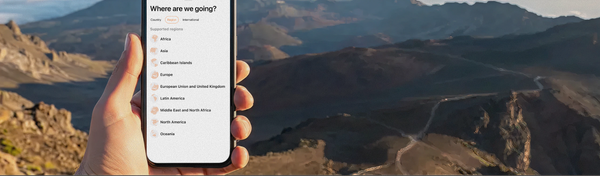
- How it works: Open the app and go to the eSIM section. Choose a country or region (Europe, Asia, the USA, etc.).
- When you’ll need it: You want internet right after landing to call a taxi, open maps, or message friends.
- What to choose: Buy a package for a single country (e.g., Thailand or Turkey) or an entire region if you’re traveling across Europe.
- Pro tip: Install the eSIM before departure. It activates automatically as soon as your phone picks up a local network. It’s magic that saves you hours in airport queues.
2. Calls to Mobile and Landline Numbers (VoIP)
Even when you have local internet, calling your bank, hotel support, or family on a landline can be expensive and complicated. Dingo solves this with high-quality VoIP calls.
- Where you can call: Mobile and landline numbers anywhere in the world. Rates are transparent and much cheaper than your operator’s roaming fees.
- How to call: Simply open the dial pad, enter the number in international format (with
+and the country code), or choose a contact from your phonebook. - When it’s useful: You urgently need to confirm a hotel booking by phone, contact a local guide, or call relatives who don’t have smartphones.
3. “Just Like at Home”: Personal Number Authorization (Caller ID)
This is perhaps the most lifesaving feature for business travelers and regular tourists alike.
When you call through Dingo, the person on the other end sees your real personal number on their caller ID — not a random foreign number.
- Why it matters: People don’t trust calls from unknown international numbers. With Dingo, your friend sees your name, and your bank or government services can identify you by your phone number.
- How to set it up: Go to Settings in the app, select Caller ID, and tap “Verify your number.” You will receive an incoming call. When you answer, you’ll need to enter the confirmation code using tone dialing (the keypad on your iPhone). You’ll see the code displayed on your screen inside the Dingo app.
- Important: Do this once before your trip — and Dingo will “link” your personal number for good.
4. Managing Your Balance: How to Top Up
Dingo offers several ways to top up your account so you stay connected even without your usual payment methods abroad.
- Bank cards (major types supported).
- Apple Pay (pay with one touch, no need to enter card details).
- In-app purchases (via the App Store).
- Promo codes, vouchers, and coupons — we often share them on social media and in newsletters. Follow our promotions to get cashback or discounts on calls.
5. Staying Organized: Saving Contacts
Dingo integrates with your iPhone in the most convenient way possible.
- How it works: See a useful number inside Dingo (e.g., from a partner or support service)? Just tap “Save” — the contact will be added automatically to your iPhone’s system address book. You don’t have to manually copy numbers and switch between apps.
- When it’s useful: You bought an eSIM, found a helpful local emergency number or a great restaurant — save it in two taps, and it’s always there in your native contacts list.
6. Secret Money-Saving Feature: Promo Codes & Cashback
Traveling is expensive, so we help you save on connectivity.
- Discount promo codes lower your rates for calls or eSIM purchases.
- Cashback is credited to your balance for certain actions or top-ups.
- Where to find them: In the “Promotions” section inside the app, as well as right here on the Travel Tech & Tips by Dingo blog.
Quick Checklist: How to Start Using Dingo Today
- Download Dingo from the App Store .
- Register with your phone number.
- Top up your balance using any convenient method (card, Apple Pay, promo code).
- Before departure: Buy an eSIM for your destination country.
- For calls: Go to Settings → Caller ID and verify your number via the incoming call with the tone-dialing code.
- Save any useful contacts directly from the app to your iPhone’s address book.
- Travel and stay connected without roaming fees!
With Dingo, the world gets closer, and connectivity gets cheaper. Bon voyage! 🚀